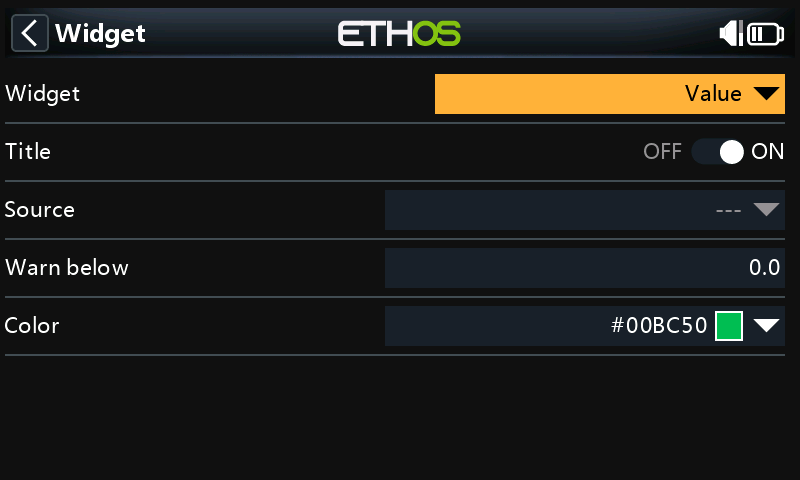
-- Value widget: one source in large text, with min/max tracking,
-- a warning threshold and a long-press menu to reset the statistics.
-- https://frskyrc.github.io/ethos-lua-doc/cookbook/value-widget/

local SETTINGS_VERSION = 1

-- colors and fonts are computed once, at file level, not in paint()
local COLOR_WARN = lcd.RGB(230, 50, 50)
local FONTS = { FONT_XXL, FONT_XL, FONT_L, FONT_M, FONT_S }

local function create()
  return {
    source = nil,         -- chosen in configure()
    warnBelow = 0,        -- 0 = no warning; stored in tenths (e.g. 105 = 10.5)
    color = lcd.RGB(0, 190, 80),
    -- runtime state
    shown = nil,          -- last value as displayed (quantized), for change detection
    text = "--", minText = "", maxText = "",
    min = nil, max = nil,
    warn = false,
    fitKey = nil, fitFont = FONT_M,  -- cached font choice for the current size + text length
  }
end

local function fmt(widget, v)
  local d = widget.source:decimals()
  return string.format("%." .. d .. "f", v)
end

local function wakeup(widget)
  local src = widget.source
  if not src then return end

  local v = src:value()
  if v == nil then
    if widget.shown ~= nil then
      widget.shown, widget.text = nil, "--"
      lcd.invalidate()
    end
    return
  end

  -- compare at display precision so sensor noise doesn't cause redraws
  local scale = 10 ^ src:decimals()
  local shown = math.floor(v * scale + 0.5)
  if shown == widget.shown then return end
  widget.shown = shown

  widget.text = src:stringValue()
  if not widget.min or v < widget.min then widget.min = v; widget.minText = "min " .. fmt(widget, v) end
  if not widget.max or v > widget.max then widget.max = v; widget.maxText = "max " .. fmt(widget, v) end
  widget.warn = widget.warnBelow > 0 and v * 10 < widget.warnBelow
  lcd.invalidate()
end

local function pickFont(widget, w, h)
  -- re-fit only when the size or the text length changes
  local key = w * 100000 + h * 100 + #widget.text
  if key == widget.fitKey then return widget.fitFont end
  widget.fitKey = key
  for i = 1, #FONTS do
    lcd.font(FONTS[i])
    local tw, th = lcd.getTextSize(widget.text)
    if tw <= w - 8 and th <= h * 0.7 then
      widget.fitFont = FONTS[i]
      return FONTS[i]
    end
  end
  widget.fitFont = FONTS[#FONTS]
  return widget.fitFont
end

local function paint(widget)
  local w, h = lcd.getWindowSize()
  local fg = lcd.themeColor(THEME_DEFAULT_COLOR)

  if not widget.source then
    lcd.font(FONT_S)
    lcd.color(fg)
    lcd.drawText(w / 2, h / 2 - 8, "Configure a source", CENTERED)
    return
  end

  lcd.font(pickFont(widget, w, h))
  local _, th = lcd.getTextSize(widget.text)
  lcd.color(widget.warn and COLOR_WARN or widget.color)
  lcd.drawText(w / 2, (h - th) / 2, widget.text, CENTERED)

  if h > 80 then
    lcd.font(FONT_XS)
    lcd.color(fg)
    lcd.drawText(4, h - 16, widget.minText)
    lcd.drawText(w - 4, h - 16, widget.maxText, RIGHT)
  end
end

local function resetStats(widget)
  widget.min, widget.max, widget.minText, widget.maxText = nil, nil, "", ""
  widget.shown = nil  -- force a refresh on the next wakeup
end

local function menu(widget)
  return { { "Reset min/max", function() resetStats(widget) end } }
end

local function configure(widget)
  local line = form.addLine("Source")
  form.addSourceField(line, nil, function() return widget.source end,
    function(v) widget.source = v; resetStats(widget) end)

  line = form.addLine("Warn below")
  local f = form.addNumberField(line, nil, 0, 10000,
    function() return widget.warnBelow end,
    function(v) widget.warnBelow = v; widget.shown = nil end)
  f:decimals(1)
  f:help("0 disables the warning color")

  line = form.addLine("Color")
  form.addColorField(line, nil, function() return widget.color end,
    function(v) widget.color = v end)
end

local function read(widget)
  local _ = storage.read("v")  -- settings version, for future migrations
  widget.source = storage.read("source")
  widget.warnBelow = storage.read("warn") or 0
  widget.color = storage.read("color") or widget.color
end

local function write(widget)
  storage.write("v", SETTINGS_VERSION)
  storage.write("source", widget.source)
  storage.write("warn", widget.warnBelow)
  storage.write("color", widget.color)
end

local function init()
  system.registerWidget({
    key = "valuewg", name = "Big value",  -- "Value" would clash with the built-in widget
    create = create, wakeup = wakeup, paint = paint,
    configure = configure, read = read, write = write, menu = menu,
  })
end

return { init = init }