Cookbook
Complete scripts you can copy onto a radio. Each recipe is a real file in examples/cookbook/ of this site's repository, embedded here unchanged. They all follow the best practice rules, with comments where a rule applies.
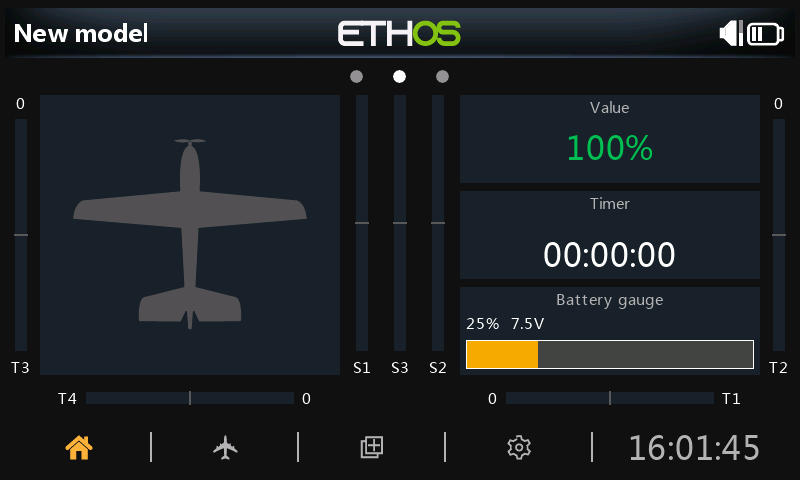 The value, timer and battery gauge recipes on an X20S in the Ethos 26.1 simulator.
| Recipe | Type | Shows how to |
|---|---|---|
| Telemetry value widget | Widget | Font fitting, change detection, min/max, menu entries, versioned settings |
| Battery gauge widget | Widget | Lookup curves, color thresholds, theme-aware drawing |
| Background alert task | Task | Throttling, hysteresis, voice and haptic alerts, task settings |
| System tool with a form | System tool | Forms, dialogs, file-based settings, absolute paths, cleanup on close |
| Lua source | Source | Computed sources usable in mixes and logic switches |
| Timer control | Widget | Model timers, touch events, context menus |
| Memory monitor | Task | Measuring heap, bitmap RAM and stack while developing |
Install any recipe: copy its folder (for example valuewgt/) into the radio's scripts/ folder, or the simulator's, and restart. Widgets then appear in the widget list of Configure screens, tools on the System menu, and tasks and sources under the model's Lua page.
Tested in the simulator
Every recipe here was loaded in the Ethos 26.1 simulator (X20S) through ethos-tools: no load errors, and the widgets, configuration forms and the tool were driven through the UI. Some of the pitfalls on this site, such as the relative path bug and mask polarity, were found this way.
More examples
- Official FrSky examples: twenty scripts from FrSky covering every script type.
- Real-world usage on every API page: excerpts from open-source projects showing how each function is used in production code.